> For the complete documentation index, see [llms.txt](https://docs.voltera.io/docs/llms.txt). Markdown versions of documentation pages are available by appending `.md` to page URLs; this page is available as [Markdown](https://docs.voltera.io/docs/v-one/learn-v-one/hardware-overview/v-one-maintenance-and-care.md).
# V-One Maintenance and Care
The Voltera V-One is a robust machine, but should be properly maintained to ensure consistently high quality printing.
### Protect the Nozzle!
The golden rule of good quality printing is to protect the dispenser nozzle. If the nozzle tip is bent, broken, covered in debris, or dented, the print quality will be drastically effected.
* Gently wipe the nozzle with a clean tissue to remove ink or particle build up.
* Always store the dispenser with the nozzle cap on. Take care when removing the cap.
### Protect the Probe!
The probe is essential to good quality circuit printing.
* Always cap the probe when it is not mounted.
* Be gentle with the tip of the probe. If the probe is damaged, contact us for assistance.
* Ensure that the metal contacts on the probe cap are clean. If necessary, clean the contacts with a cotton swab and isopropyl alcohol.
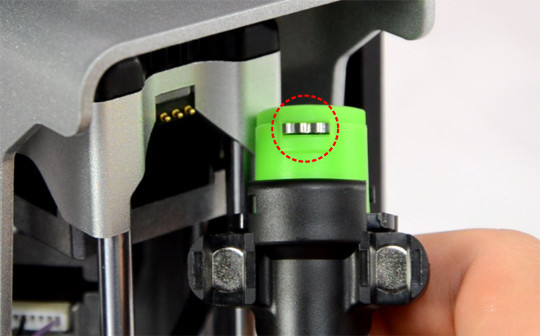
### Protect the Pogo Pins!
The pogo pins are the gold pins on the carriage that touch the contact pads on the tools to communicate and provide power to them.
* Visually inspect the pins regularly to make sure they're straight and even.
* [Mount the tools from the bottom or side](/docs/v-one/learn-v-one/hardware-overview/mounting-the-v-ones-tools.md) - **never the top** - to make sure no excessive pressure is being put on the pins.
{% hint style="warning" %}
Mounting tools from the top can put too much pressure on the pogo pins, causing excess wear or breakage.
{% endhint %}
### Storing the Ink & Paste
The conductive ink and solder paste should be stored in a cool, dark place between 4-10°C (40-50°F), with caps on, to preserve their shelf life. The probe must be stored at room temperature.
Improper storage may result in a decrease of shelf life and print quality!
If the inks were left out by accident:
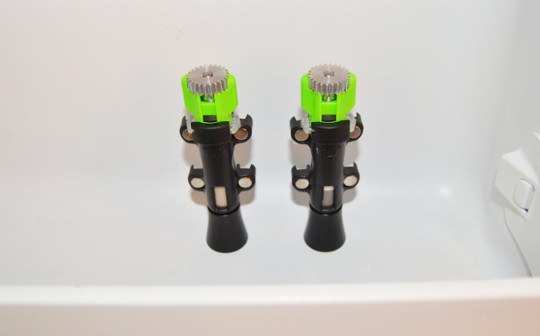
* If the ink or solder paste is left out for more than a day, we recommend that you purge the fluid in the nozzle by manually turning the dispensing gear.
{% hint style="danger" %}
If no ink or paste is coming out, the nozzle is clogged. **DO NOT** try to clear the clog by force - this can puncture the piston in the cartridge. You must replace the nozzle.
{% endhint %}
### Limit Switch Cleaning
Ensure that the limit switches do not have ink build-up. Ink on the switches can lead to improper height calibration, which will cause poor quality printing or a broken nozzle!
If ink has built up on the limit switches use a cotton swab with some isopropyl alcohol to gently wipe off the ink.
Always inspect and clean the limit switches before starting a Print or Solder Paste workflow.
### Cleaning Off Inks
Wet inks can generally be wiped off using a paper towel or tissue. If ink gets on your skin, wash thoroughly with soap and warm water. For safety information, [refer to the SDS](/docs/v-one/downloads/safety-data-sheets.md).
Dried ink that has not been baked can be cleaned by applying a small amount of isopropyl alcohol and rubbing with a paper towel.
Inks that have been baked are much more difficult to remove. Apply acetone to the baked ink, and rub vigorously using a burnishing pad. Repeat until the baked ink has been removed.
### Heated Bed Maintenance
Make sure that the printing platform does not have wet ink on it before a curing or reflow step. This will bake the ink, making it very difficult or impossible to remove.
### Transporting the V-One
When moving the V-One, do so by lifting by the base with two hands. Avoid lifting the machine by the bridge. For long distance transportation or shipping, it is recommended to store the V-One upright in the original packaging to avoid any damage during travel.
---
# Agent Instructions
This documentation is published with GitBook. GitBook is the documentation platform designed so that both humans and AI agents can read, navigate, and reason over technical content effectively. Learn more at gitbook.com.
## Querying This Documentation
If you need additional information that is not directly available in this page, you can query the documentation by asking a question.
Perform an HTTP GET request on the following URL with the `ask` and `goal` query parameters:
```
GET https://docs.voltera.io/docs/v-one/learn-v-one/hardware-overview/v-one-maintenance-and-care.md?ask=&goal=
```
`ask` is the immediate question: it should be specific, self-contained, and written in natural language.
`goal` is what the user is ultimately trying to achieve, the reason they need the answer. Sharing it helps GitBook give you a better, more relevant answer. A goal is most helpful when it describes the outcome the user wants rather than restating the question. For example, with `ask=how do I create an API token`, a goal like `automate deployments from our CI pipeline` lets GitBook tailor the answer to that use case.
The response will contain a direct answer to the question and relevant excerpts and sources from the documentation.
Use this mechanism when the answer is not explicitly present in the current page, you need clarification or additional context, or you want to retrieve related documentation sections.


