> For the complete documentation index, see [llms.txt](https://docs.voltera.io/docs/llms.txt). Markdown versions of documentation pages are available by appending `.md` to page URLs; this page is available as [Markdown](https://docs.voltera.io/docs/v-one/getting-started/printer-setup.md).
# Printer Setup
## Unpacking your V-One
The V-One will arrive in a single box with all the included tools and accessories inside. If you also purchased the optional drill attachment, this will be included in the box as well.
Once you’ve opened the box, remove the Tools and Accessories box as well as the power cable box. Place them aside for now, and remove the V-One in its foam from the box. Avoid picking the V-One up by the bridge. Instead, use two hands and lift it from the base.
{% hint style="info" %}
The pictures above represent the packaging including the optional V-One Drill Attachment add on.
{% endhint %}
The V-One comes with all the tools and accessories you need to get started:
### Tools & Accessories
* 1 - Probe
* 2 - Dispensing Units
* 3 - Tip caps
* 1 - USB Cable
* 1 - Power Cable
* 4 - Thumbscrews
* 2 - Board Clamps
* 1 - Tweezers
* 1 - Voltera Disposable Nozzles - 25 Pack
### Consumables
* 1 - Conductive Ink Cartridge
* 1 - Solder Paste Cartridge
* 1 - Solder Wire Spool
* 1 - Hello World Circuit Kit
* 10 - 2" x 3" FR1 Substrates
* 6 - 3" x 4" FR1 Substrates
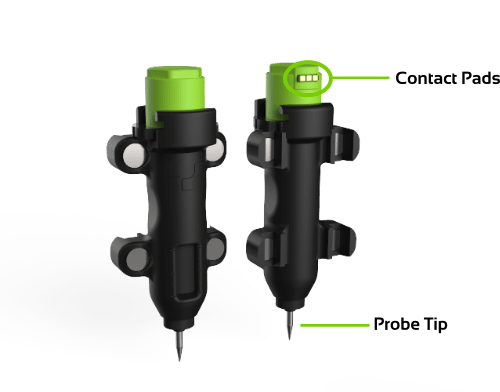
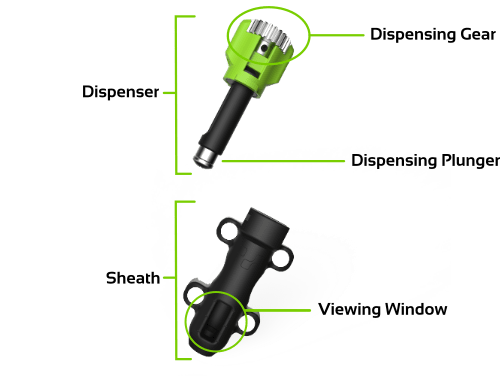
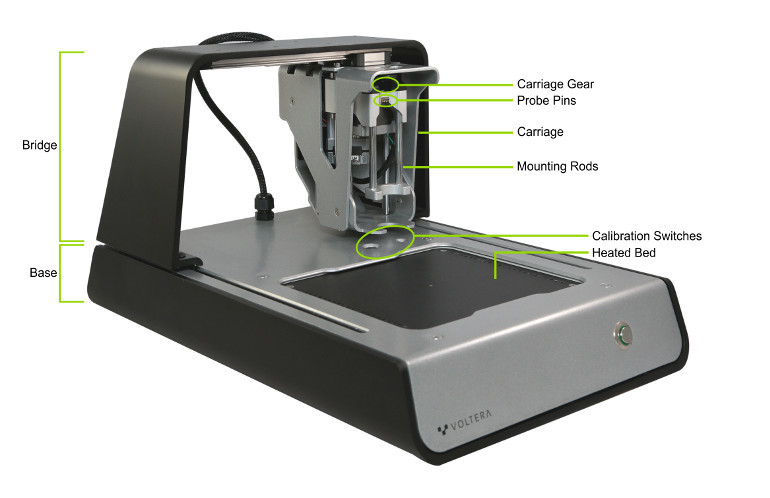
## Printer Anatomy
Take some time to get comfortable with the parts of the V-One. We will be working with them over the next couple of sections.
#### Probe:
#### Dispenser:
#### V-One:
## Software Installation
Download the V-One software installer for your operating system. Open the file and install on your system.
{% content-ref url="/pages/GPt17y2hw3zba60cQBFS" %}
[Download the V-One Software](/docs/v-one/downloads/download-the-v-one-software.md)
{% endcontent-ref %}
## Setting Up Your V-One
#### Find a spot for your V-One.
* A flat, level surface with minimum vibration is optimal.
* A well ventilated area is recommended.
* Do not place the V-One on a surface that is susceptible to heat damage.
* Avoid exposure to extreme temperatures – room temperature is ideal.
#### Connect your V-One.
* Connect the USB cable to the V-One, then to your computer.
* Connect the power cable to the V-One, then to an outlet.
* Open the Voltera V-One software.
{% hint style="warning" %}
The V-One may require a firmware update on startup. Do not disconnect or turn off the V-One during the firmware update!
{% endhint %}
Now you are ready to get printing!
---
# Agent Instructions
This documentation is published with GitBook. GitBook is the documentation platform designed so that both humans and AI agents can read, navigate, and reason over technical content effectively. Learn more at gitbook.com.
## Querying This Documentation
If you need additional information that is not directly available in this page, you can query the documentation by asking a question.
Perform an HTTP GET request on the following URL with the `ask` and `goal` query parameters:
```
GET https://docs.voltera.io/docs/v-one/getting-started/printer-setup.md?ask=&goal=
```
`ask` is the immediate question: it should be specific, self-contained, and written in natural language.
`goal` is what the user is ultimately trying to achieve, the reason they need the answer. Sharing it helps GitBook give you a better, more relevant answer. A goal is most helpful when it describes the outcome the user wants rather than restating the question. For example, with `ask=how do I create an API token`, a goal like `automate deployments from our CI pipeline` lets GitBook tailor the answer to that use case.
The response will contain a direct answer to the question and relevant excerpts and sources from the documentation.
Use this mechanism when the answer is not explicitly present in the current page, you need clarification or additional context, or you want to retrieve related documentation sections.
.jpg?alt=media&token=8d494a0e-af80-406c-947f-c8f35f840601)
.jpg?alt=media&token=245bae57-eaf7-4b2c-a2ad-6ff14886154e)
.jpg?alt=media&token=f6456966-bb11-4f37-b6d6-f8e10f08e978)
.jpg?alt=media&token=85a8ba44-9782-4da3-9dbb-cc95d51ad439)
.jpg?alt=media&token=7a7ba07e-bad7-40a9-9972-4cb156065e65)
.jpg?alt=media&token=aec99f37-cc94-4742-9a12-e48373882c19)
.jpg?alt=media&token=e0f02f06-c7e6-4b23-8f82-901e0273b672)